Parallel Training with PyTorch
Created on June 20, 2026.
This article belongs to series Efficient ImageNet
Training on multiple graphics cards can be mathematically equivalent to single-card training. It is just sometimes prohibitive due to challenges such as CPU/memory bottleneck, and the difficulty in implementing the training utilities.
An important lesson taught by the CPU bottleneck is that part of the preprocessing jobs belongs to somewhere outside the training script, especially when you plan to use two graphics cards. Take ImageNet for example, since DataLoader generally does not hold old batch cache, images need to be resized at the beginning of every batch. This leads to 1.28 million resize operations per epoch, and 128 million if you were to train for 100 epochs, while these operations are totally avoidable.
For compressing ImageNet and avoiding resizing during training, please refer to the previous note. In this article, we will design utilities for parallel training on ImageNet with techniques brought by PyTorch Distributed Data Parallel (DDP), which is designed for synchronizing data (especially parameters and their gradients) across different processes during training. You can find an official tutorial on DDP here.
Basic Concepts
In distributed training, the number of training processes is called world size, and the unique identifier of each process is called a rank. Comparing to concepts in operating systems, these concepts are similar to process count and process ID (PID). The major difference between concepts in distributed training and the OS is that in distributed training, both world size and rank are fixed and are not dynamically assigned at runtime. Intuitively, they describes processes:
processes = (Process(target=fn) for rank in range(world_size))PyTorch also defines nodes, which are generally physical or conceptual devices. For example, when training the same model on three servers, the node count is 3. And if each server possesses two graphics cards, then the world size becomes
Allreduce
In distributed systems, reduce refers to the process of aggregating data scattered across multiple computers or nodes into a single result, which is then synchronized to specific targets (e.g., node with some rank).
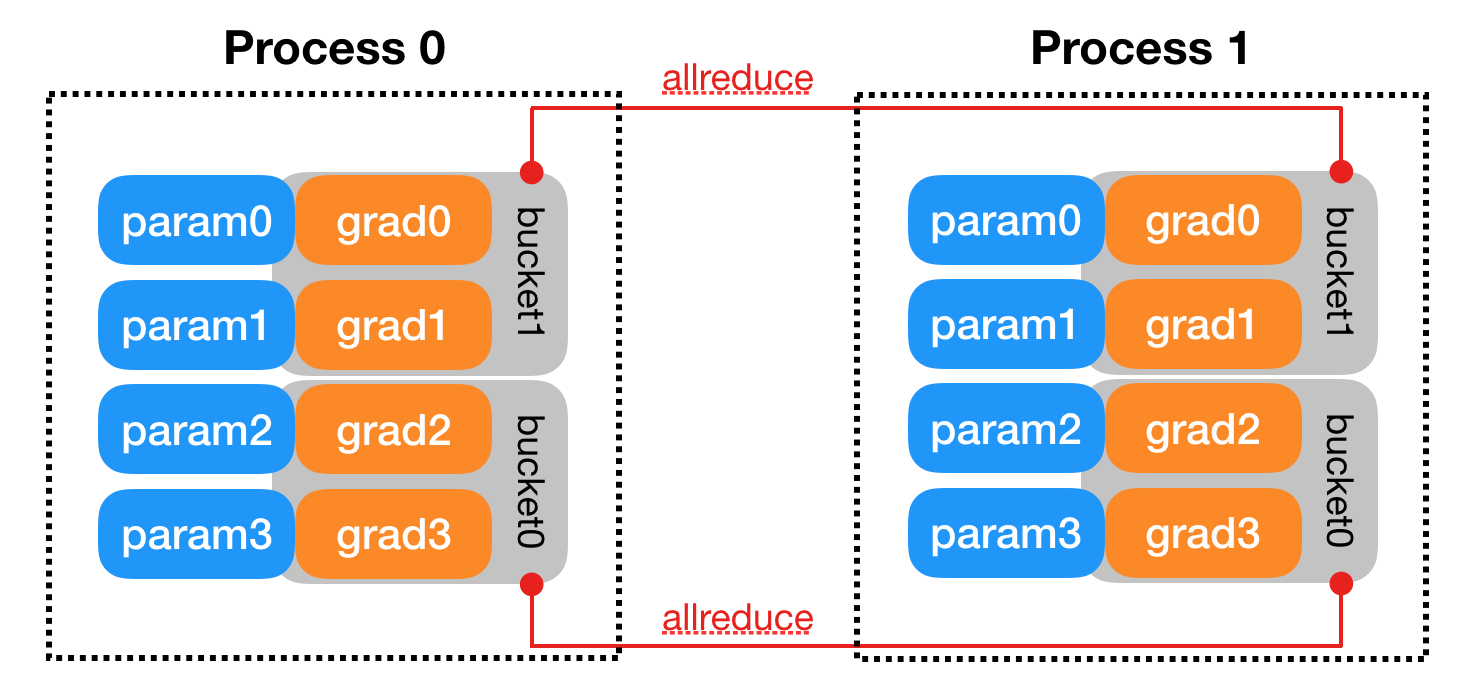
If the result is synchronized to all nodes, then we use the term allreduce (or all-reduce) instead [Source]. Fig. 1 shows the process of synchronizing data across two processes through allreduce in PyTorch.
Process Group
In DDP, processes that are allowed to communicate with each other belong to the same process group. The communication operation is implemented on a certain backend. Initializing a process group in PyTorch requires three parameters backend world_size rank:
import torch
import torch.distributed as dist

# register before initialization
os.environ['MASTER_ADDR'] = 'localhost'
os.environ['MASTER_PORT'] = '12355'

acc = torch.accelerator.current_accelerator()  # e.g., CUDA
backend = dist.get_default_backend_for_device(acc)
dist.init_process_group(backend, world_size=world_size, rank=rank)

# cleanup
dist.destroy_process_group()
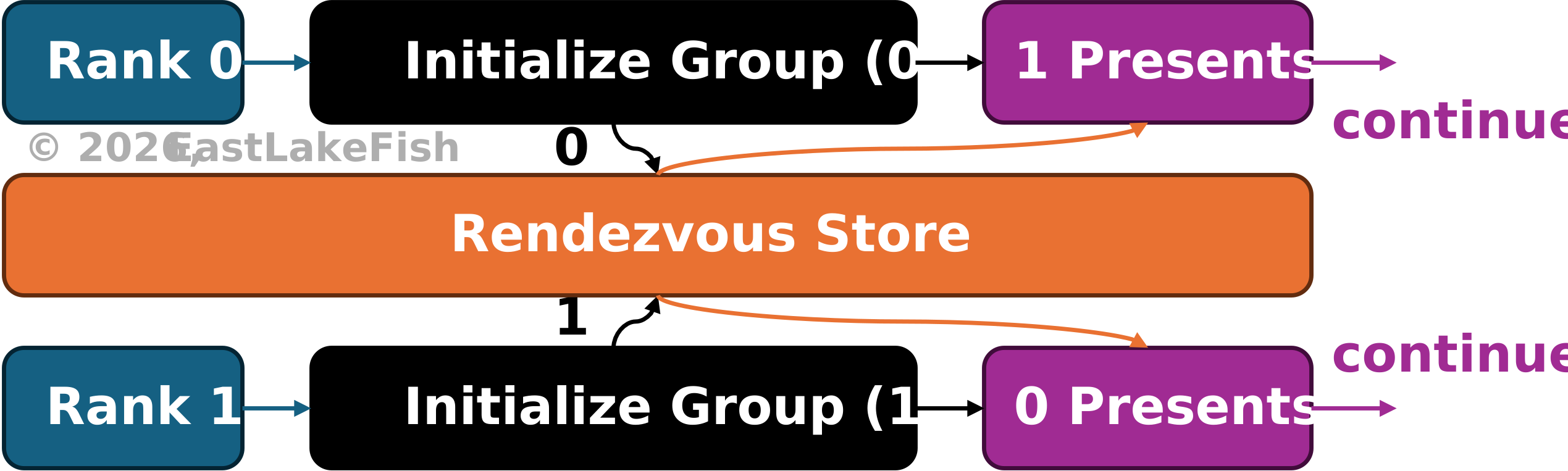
During initialization, each training process initializes the process group and wait until all these processes finish initialization. This is implemented by rendezvous mechanism (pronunciation: ron-day-voo), which can be regarded as allreduce before the process group is fully initialized.
DistributedDataParallel
As discussed earlier, DDP synchronizes model parameters and gradients through allreduce across models distributed on different processes. This requires a special layer that handles inter-process communication and performs automatic allreduce.
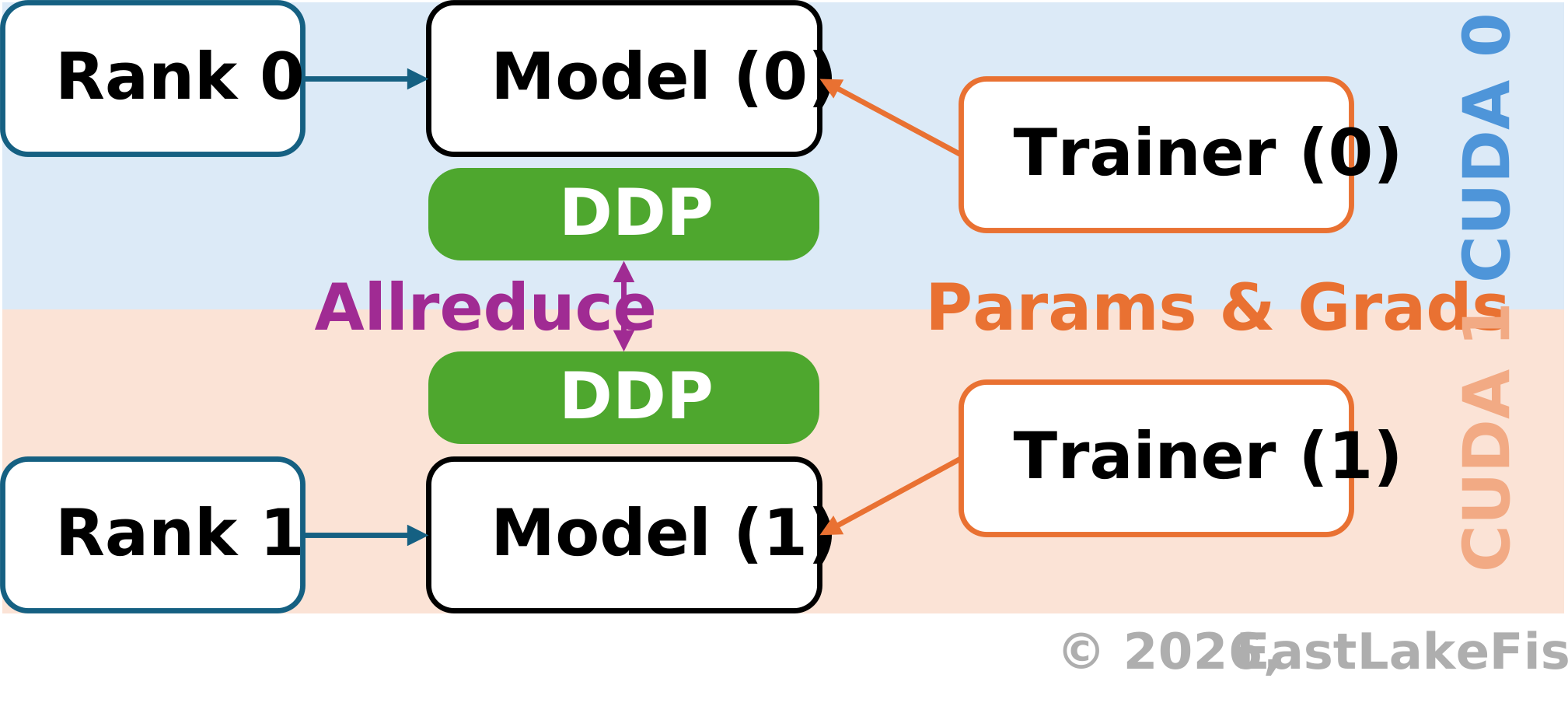
In PyTorch, this is implemented by torch.nn.parallel.DistributedDataParallel:
from torch import nn
from torch.nn.parallel import DistributedDataParallel as DDP

def process(rank: int):
    model = nn.Module().to(f"cuda:{rank}")
    ddp_model = DDP(model, device_ids=[rank])
Let
Mathematically, this is equivalent to the process of updating the model with a larger batch size using a single process. However, this equivalence doesn't hold in many practical scenarios. For example, the order of floating-number reduction
can make a great difference, not to mention random modules such as Dropout.
Therefore, DDP often offers an approximation of single-card training, instead of a strict equivalence. Fortunately, even this approximation is sufficient in practice and is widely adopted by the community.
Loading ImageNet
As discussed before, different training processes should look at different partitions of the training data. If two processes share the same partition of data, allreduce approximates training the model on the same batch for two epochs, rather than training with a larger batch.
Therefore, we need to include the batch partitioning logic within the dataset we use. That is, suppose we have
where
This dataset can be loaded with the default DataLoader in PyTorch.
Run Parallel Training
torchrun is an alias for python -m torch.distributed.run, which establishes an stable environment for parallel training by assigning necessary environmental variables (see official docs), spawning training processes and managing their communications (through rendezvous mechanism).
Since torchrun already manages environmental variables, subprocesses can access them without defining them in advance:
import os
import torch
import torch.distributed as dist

def init_process() -> int:
    local_rank = int(os.environ["LOCAL_RANK"])
    torch.cuda.set_device(local_rank)
    dist.init_process_group("nccl")  # use gloo on Windows
    return local_rank

def cleanup() -> None:
    if dist.is_initialized():
        dist.destroy_process_group()

if __name__ == "__main__":
    print(f"Local rank: {init_process()}")
    cleanup()
Results:
# torchrun --nproc-per-node=2 torchrun_example.py
Local rank: 0
Local rank: 1
--nproc-per-node specifies the process count in each node (by default, the node count is 1, which can be adjusted by --nnodes).